VXD-720 Out of Band Mod
These are the instructions for modifying a Vertex VXD-720 high band split radio
(450-512 MHZ), to be programmed into the amateur 440 band using the
Vertex Clone Editor CPS software and the HXD hex editor.
1. Download and install HXD hex editor, do a Google search.
2. Launch the Vertex CloneEditor, Read the radio and save the file. Note the band limits (450.000 - 512.000 MHz) by clicking on VXD720 at the top. Leave the CPS window open.
3. Launch your hexeditor (HXD.exe), Click on “Extras”, “Open RAM” and then click on
“Vertexcloneeditor.exe”
4. Next, press control+R (or edit > replace)
Showing posts with label Motorola CPS. Show all posts
Showing posts with label Motorola CPS. Show all posts

Updating Motorola Firmware
Updating Motorola Firmware
RE :: MTS2000
The upgrade is fairly self-explanatory, pull down "Tools->Flashport->Upgrade" and in the box, select COM: port and point to the file you get above. Make sure your iButton is inserted, and away you go. The procedure will have you reset the radio (power off and on again), and take about 10-15 minutes.
Be VERY patient as it will look like nothing is going on while it loads the firmware to the SRIB. It may even say CPS is not responding. Just walk away from the computer and go watch TV for awhile and let it do its thing.
Disable any power management, screen savers etc prior and make sure you have a fresh hot battery on the radio is not mobile.
RE :: MTS2000
The upgrade is fairly self-explanatory, pull down "Tools->Flashport->Upgrade" and in the box, select COM: port and point to the file you get above. Make sure your iButton is inserted, and away you go. The procedure will have you reset the radio (power off and on again), and take about 10-15 minutes.
Be VERY patient as it will look like nothing is going on while it loads the firmware to the SRIB. It may even say CPS is not responding. Just walk away from the computer and go watch TV for awhile and let it do its thing.
Disable any power management, screen savers etc prior and make sure you have a fresh hot battery on the radio is not mobile.
MTS2000 CPS Mod | Hack 900 MHz band edges
MTS2000 CPS 2.00.03 900 MHz band edges
Open MTS2000.exe using Hex Workshop.
Use the replace command to look for the following hex strings, and then replace them with the provided strings. Make sure you are searching for hex values.
RX Lower Limit / TX TA Lower Limit
935.0125 = 9428BB37
Change to
926.0000 = 80A33137
Replace command should report changes in two places
TX RPT Upper Limit
901.9875 = AC3CC335
Change to
903.0000 = C0AFD235
Replace command should report changes in one place
Save your work (making a backup copy when prompted is re commended), then close Hex Workshop. Open your MTS software, and confirm that you can now enter frequencies within the Ham band without the software flagging them as invalid. If you can, then you’re all set! If not, delete your existing MTS2000.exe, then rename the extension of your MTS2000.bak file that you created to .exe, then try again
Open MTS2000.exe using Hex Workshop.
Use the replace command to look for the following hex strings, and then replace them with the provided strings. Make sure you are searching for hex values.
RX Lower Limit / TX TA Lower Limit
935.0125 = 9428BB37
Change to
926.0000 = 80A33137
Replace command should report changes in two places
TX RPT Upper Limit
901.9875 = AC3CC335
Change to
903.0000 = C0AFD235
Replace command should report changes in one place
Save your work (making a backup copy when prompted is re commended), then close Hex Workshop. Open your MTS software, and confirm that you can now enter frequencies within the Ham band without the software flagging them as invalid. If you can, then you’re all set! If not, delete your existing MTS2000.exe, then rename the extension of your MTS2000.bak file that you created to .exe, then try again
MotoTRBO Test Programs (Windows Freeware)
MotoTRBO Test Programs (Windows Freeware)
Hi guys,Update ::
I am developing Yet Another MotoTRBO Dispatcher (YAMD)
In the process - I have written several test programs which may be useful to hobbyists, amateurs or techo's.
This following is test software and I own the copyright - it is freely available from my download website - http://cimconcepts.updates.net.au
Freeware:
XcmpXnl.zip Vn 1.0.2.3
MTNetTester.zip Vn 1.0.1.2
MTS2000 Field Test
Assuming you have a display (model II or III)...
Just after your radio powers-up and goes through its self check, press the button just above the PTT button six times quickly. The radio will go into service mode and scan trough the info. To get out of serice mode, shut the radio off and restart. You may have to repeat this a few times to get all of the info since it goes by pretty quick!
I have to push mine like 5 or 6 times in a row while it is self testing to display the info. Keep pushing the button untill you hear a beep, then look at the display.
Just after your radio powers-up and goes through its self check, press the button just above the PTT button six times quickly. The radio will go into service mode and scan trough the info. To get out of serice mode, shut the radio off and restart. You may have to repeat this a few times to get all of the info since it goes by pretty quick!
I have to push mine like 5 or 6 times in a row while it is self testing to display the info. Keep pushing the button untill you hear a beep, then look at the display.
Motorola MTX838/MTS2000/MTX2000 Field Test
How to perform a basic test to JEDI/FLASHPORT series Press 5 time on 3rd button and RTFM :)Motorola MTX Series - Models B5 and B7
Motorola MTX Series - Models B5 and B7
Privacy Plus Portable Radios Operating Instructions - mtx9000-user-manual.pdf

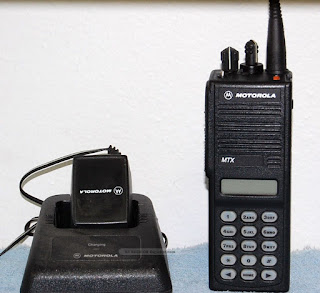
Privacy Plus Portable Radios Operating Instructions - mtx9000-user-manual.pdf


Modifying Motorola RSS and CPS Out of Band
Modifying Programming Software - Benefits and Pitfalls
People often hex-edit their programming software. The two major reasons are to allow entry of amateur frequencies and to increase the number of available channels/modes. For example, GTX software only allow 10 conventional modes, but the hardware is capable of at least 15.
The modifications often take place in a Model Definition File, a file with the MDF extension. These files are usually small and version-dependent, so you can not take an MDF file from R01 software and expect it to work with R04 software. In addition, the program reads the MDF file and adds all the byte values together, a process called "generating a checksum". It then compares that total with a known value stored in the program; if the two don't match, the software will complain and usually not let you proceed any further. This revelation often doesn't happen until after you've read the radio's code plug, and the program tries to find the model number in the MDF file but won't due to the checksum mis-match.
Some changes may have to be made in other files. For example, SPECTRA1.EXE is where the frequency limitations are maintained. This data is also controlled by a checksum, so once again it's important that if you alter bytes in one area, you make corresponding changes in another, less important area. Text messages are prime candidates for fixing checksums.
People often hex-edit their programming software. The two major reasons are to allow entry of amateur frequencies and to increase the number of available channels/modes. For example, GTX software only allow 10 conventional modes, but the hardware is capable of at least 15.
The modifications often take place in a Model Definition File, a file with the MDF extension. These files are usually small and version-dependent, so you can not take an MDF file from R01 software and expect it to work with R04 software. In addition, the program reads the MDF file and adds all the byte values together, a process called "generating a checksum". It then compares that total with a known value stored in the program; if the two don't match, the software will complain and usually not let you proceed any further. This revelation often doesn't happen until after you've read the radio's code plug, and the program tries to find the model number in the MDF file but won't due to the checksum mis-match.
Some changes may have to be made in other files. For example, SPECTRA1.EXE is where the frequency limitations are maintained. This data is also controlled by a checksum, so once again it's important that if you alter bytes in one area, you make corresponding changes in another, less important area. Text messages are prime candidates for fixing checksums.
Programming / Service software for the Motorola Radius GM300
After searching for the genuine Motorola program I came across Motorola Radius GM300 Radio Doctor. This program runs fine under Windows XP and will do all the functions that the genuine Motorola radio service software does. Here is the main screen.
GM300 WIN XP.mp4
GM300 WIN XP.mp4
Motorola XTS5000, XTS2500 Two-Way Radio Inventory, IBM T60 Programming Computers
Motorola XTS5000, XTS2500 Two-Way Radio Inventory, IBM T60 Programming Computers, Chargers, etc..
Surplus Radio Guide Series, Programming Motorola Syntor X9000 Hell
Guide to surplus radio. Demonstrating the difficulty of supporting older commercial radio equipment. Introducing DOSBOX as a solution to programming and configuring older support programs. Long series in multiple parts starting with the Motorola family of commercial radios
Motorola CPS 11.0 BUILD 596 25KHZ PATCH
CPS 11.0 BUILD 596 25KHZ PATCH
DLL for the entitlement
PLEASE unzip and copy the uncompressed "dll" files into the Motorola CPS folder in the [program files] area !

DLL for the entitlement
PLEASE unzip and copy the uncompressed "dll" files into the Motorola CPS folder in the [program files] area !
Subscribe to:
Posts (Atom)